Figuring out who to report to
County, district, authority, and state routing can be unclear from one job to the next.
Septic operations software for Texas providers
Maintenance. Compliance. Simplified.
Track jobs, inspections, photos, notes, reports, invoices, and maintenance history in one place, while SepticLedger helps handle reminders, reporting, and Texas OSSF requirements behind the scenes.
Built for providers who want the work to stay simple and the details to stay organized.
Want a guided walkthrough before creating your account? Request a demo and we’ll show you how SepticLedger fits your operation.
What’s frustrating today
County, district, authority, and state routing can be unclear from one job to the next.
Providers have to remember local steps, deadlines, and submission expectations while still running the day.
Notes, reports, invoices, customer messages, and property history often get entered more than once.
Tools that are not built around field workflow can create more clicks instead of less work.
How SepticLedger simplifies it
Each visit stays tied to the customer, property, system, report, and invoice.
Photos, notes, inspection details, pumping, maintenance, and repairs become part of the record without re-entry later.
Due soon, overdue, and completed work stay visible without manual spreadsheet tracking.
Texas reporting guidance stays visible so your team can review where things go before filing.
Built for Texas OSSF complexity
Generic tools can track jobs. SepticLedger helps operators understand what work is due, where reporting may need to go, and what needs review before anything gets filed.
Keep county reporting context visible alongside property and report history.
Handle cases where reporting does not simply follow the county name on the address.
Keep river-authority guidance available for review before filing.
Support district-style coverage where one authority serves multiple counties.
Track TCEQ-direct candidates without assuming every route is automatic.
Use review status and confidence levels so unclear cases stay manual.
Simple workflow
The work your team already does keeps everything up to date.
Upcoming maintenance, inspections, repairs, pumping, and report work stay visible by property.
Photos, notes, inspection details, service actions, and field observations are captured once on the job.
The completed visit stays connected to reporting, billing, customer communication, and property history.
Next due dates, reminders, reporting status, and review items stay tied to the property.
Texas reporting guidance
Texas reporting processes vary by location. SepticLedger keeps county and authority guidance visible so your team does not have to rely on memory.
See report timing guidance based on local requirements where verified data is available.
See where reports may need to go, including email, portal, or county-specific workflows.
Rules are labeled with confidence so you know what is verified and what still needs review.
Built from Texas county and authority sources, not generic templates or assumptions.
How it works
Add the property once. SepticLedger connects the dots between the system, the county, the report, and the next required action.
Capture the customer, system type, county, and maintenance details in one place.
SepticLedger shows local reporting guidance and the confidence level for the available county data.
The dashboard highlights deadlines, reporting cadence, and submission guidance when verified data is available.
Technicians and office staff see the same reporting guidance before reports are sent or marked submitted.
If a county rule is not fully verified, SepticLedger labels it as guidance only instead of pretending it is settled.
County Intelligence in Action
From dashboard alerts to property guidance to report submission, SepticLedger keeps the next step visible.
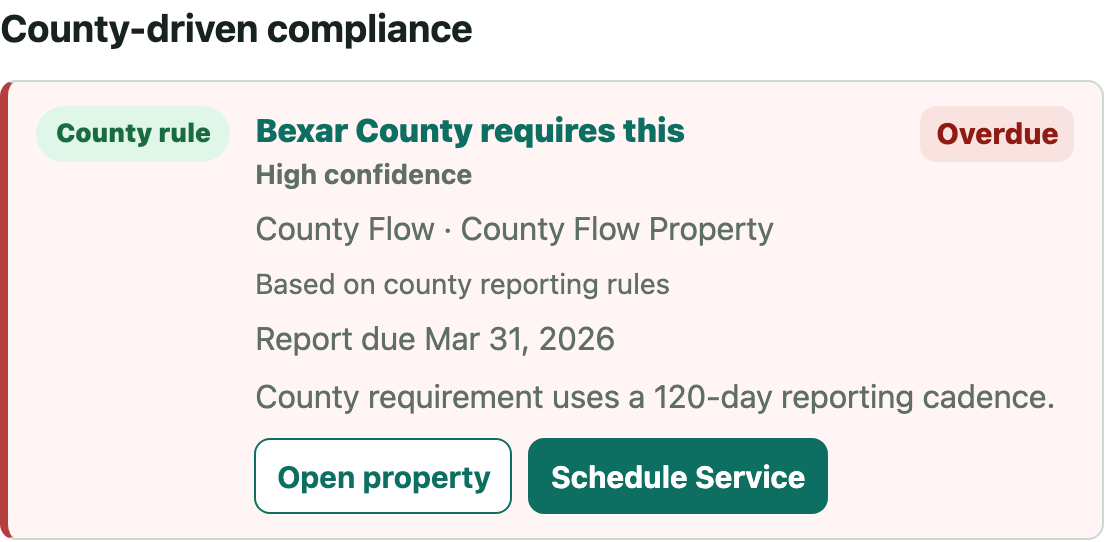
Office staff can see which items are due, overdue, verified, or still guidance-only.
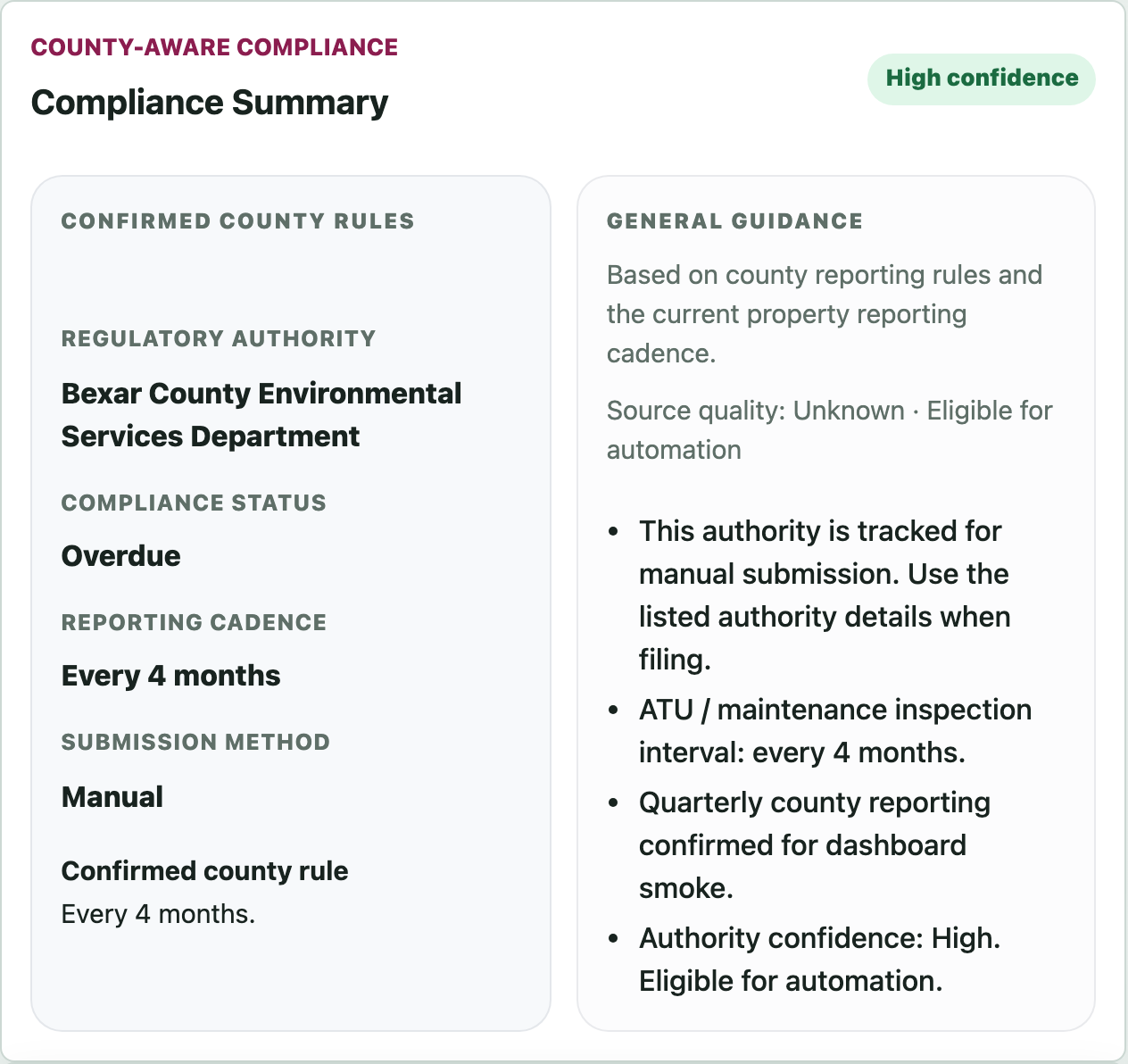
The Compliance Summary shows reporting guidance, confidence level, cadence, and submission method in one place.
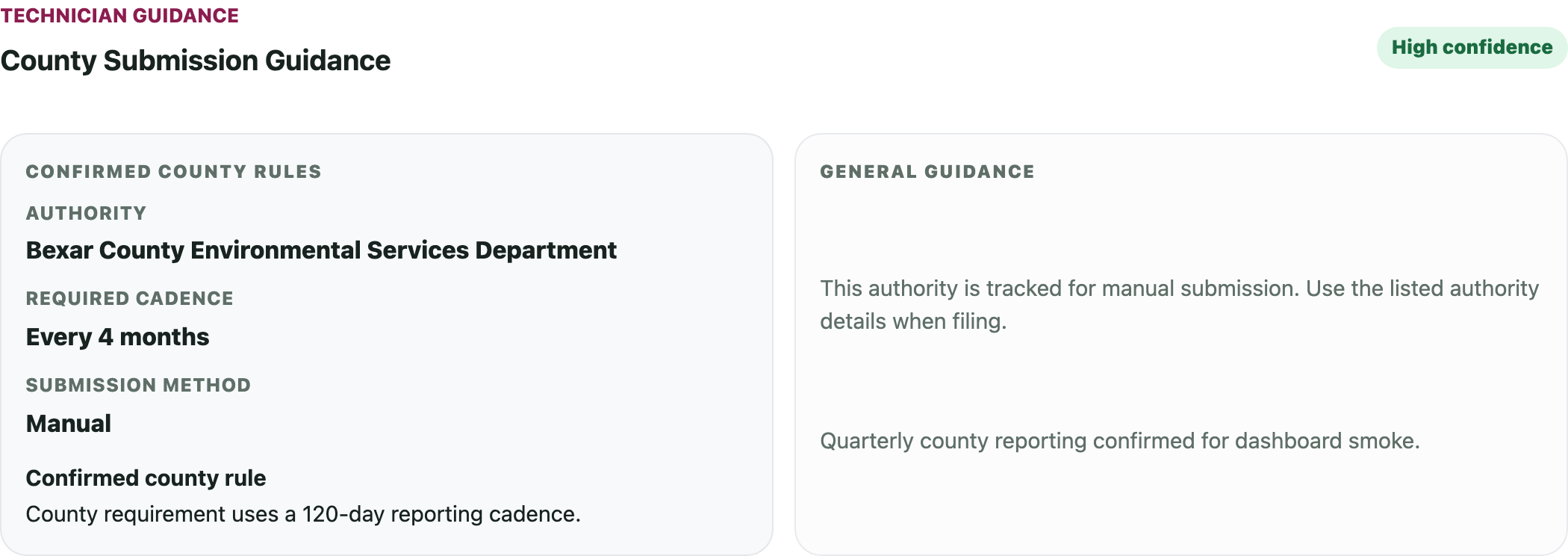
Before a report is sent or marked submitted, technicians see the cadence, confidence, and submission guidance.
See how SepticLedger can help your team track local compliance, service work, and report submissions in one place.
Why compliance context matters
Paper, spreadsheets, and generic field service tools can help complete work. SepticLedger helps show what work is due, where reporting may need to go, and what still needs review.
Track jobs and tasks after someone decides what needs doing. Store reports, notes, or invoices, but usually without reporting confidence or review context.
Tracks jobs, inspections, reports, maintenance lifecycle state, reporting guidance, customer portal access, invoices, reminders, contracts, renewals, and QuickBooks payment handoff.
In-app proof
Track every system from property history to reports, invoices, reminders, and renewals. Reports aren’t just for compliance. They help you clearly show customers what you found and what needs attention.
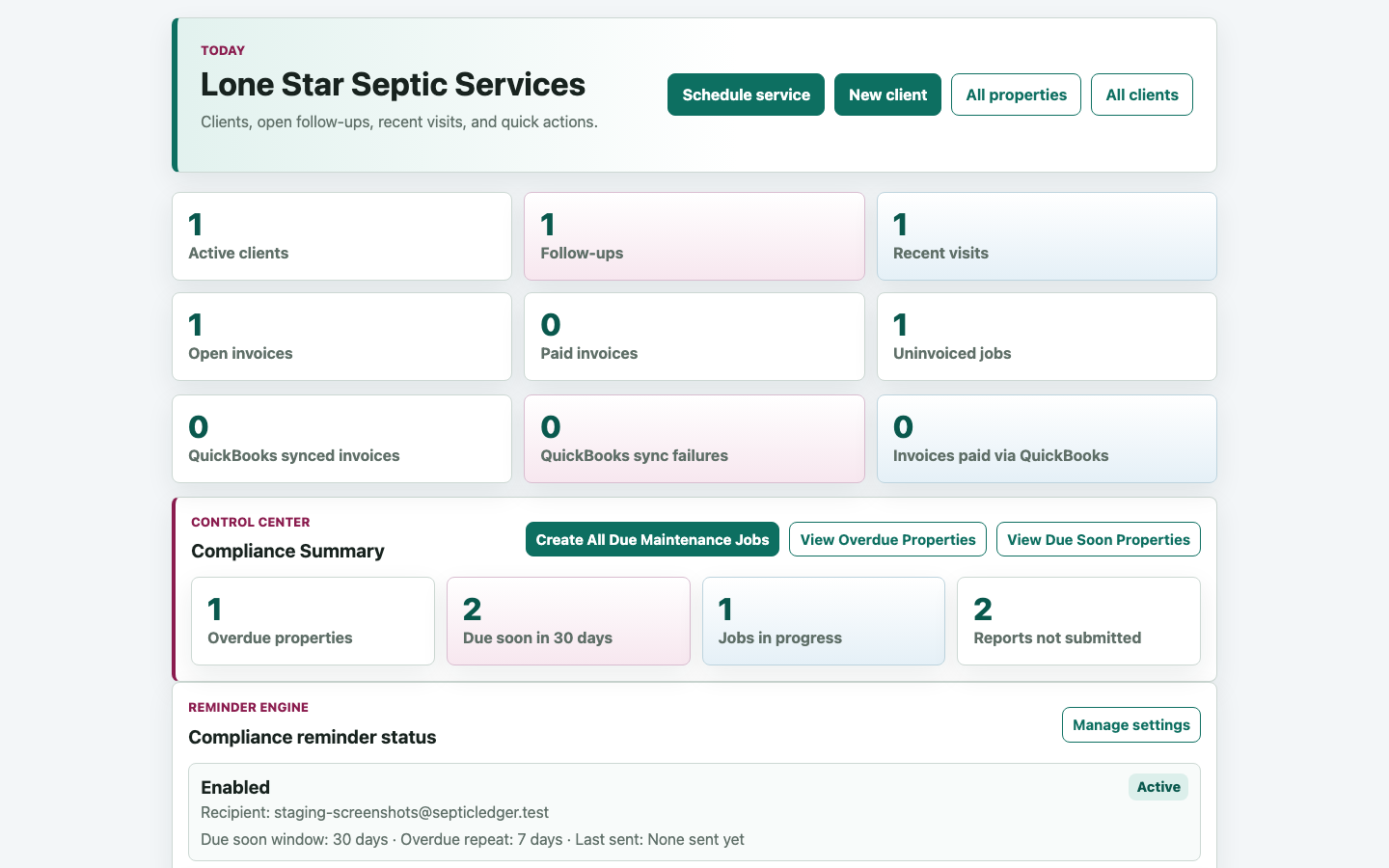
Dashboard groups keep maintenance, reminders, reporting, and compliance work visible for owners.
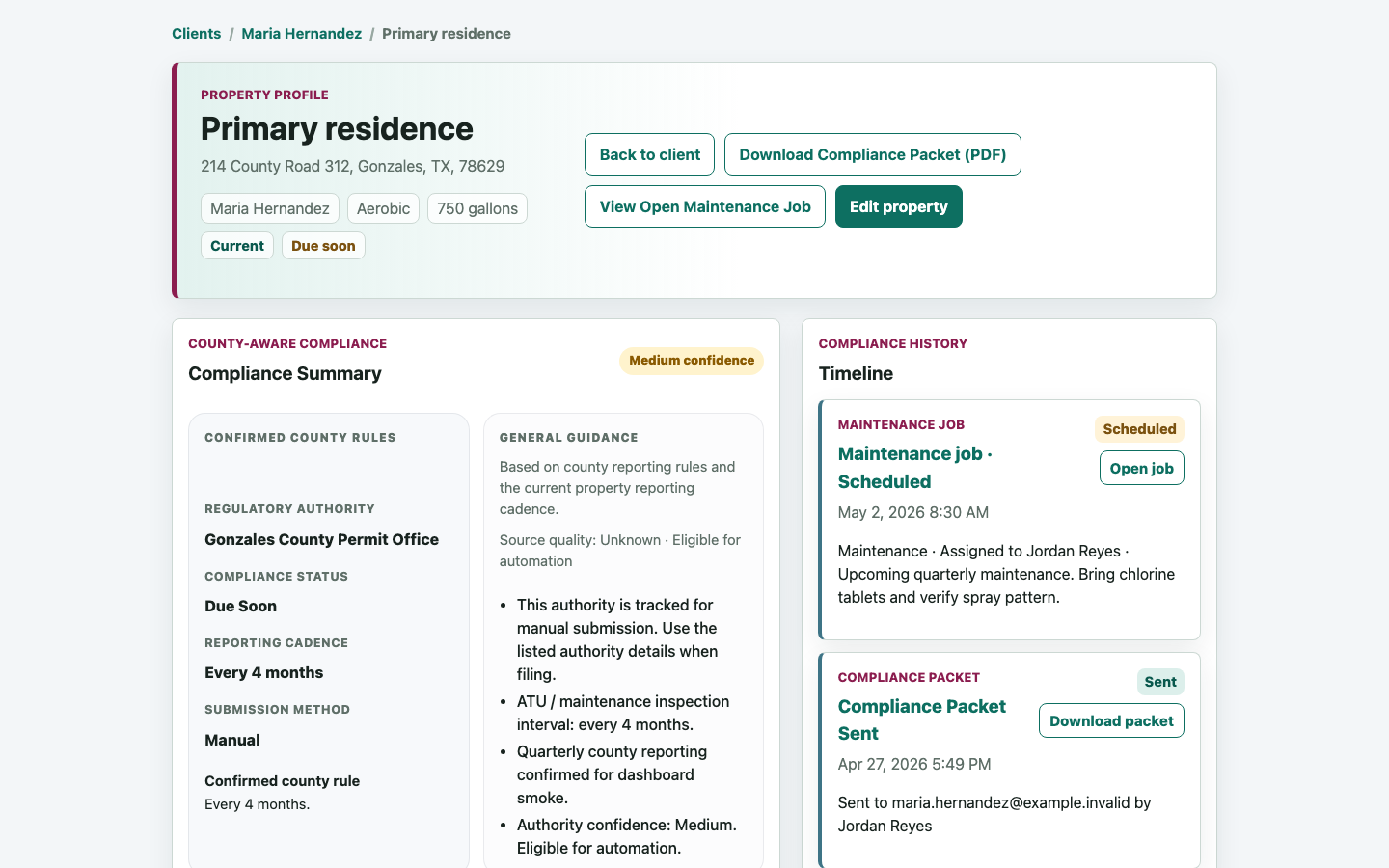
System details, maintenance schedules, reports, packets, invoices, contracts, and service history stay attached to the property.
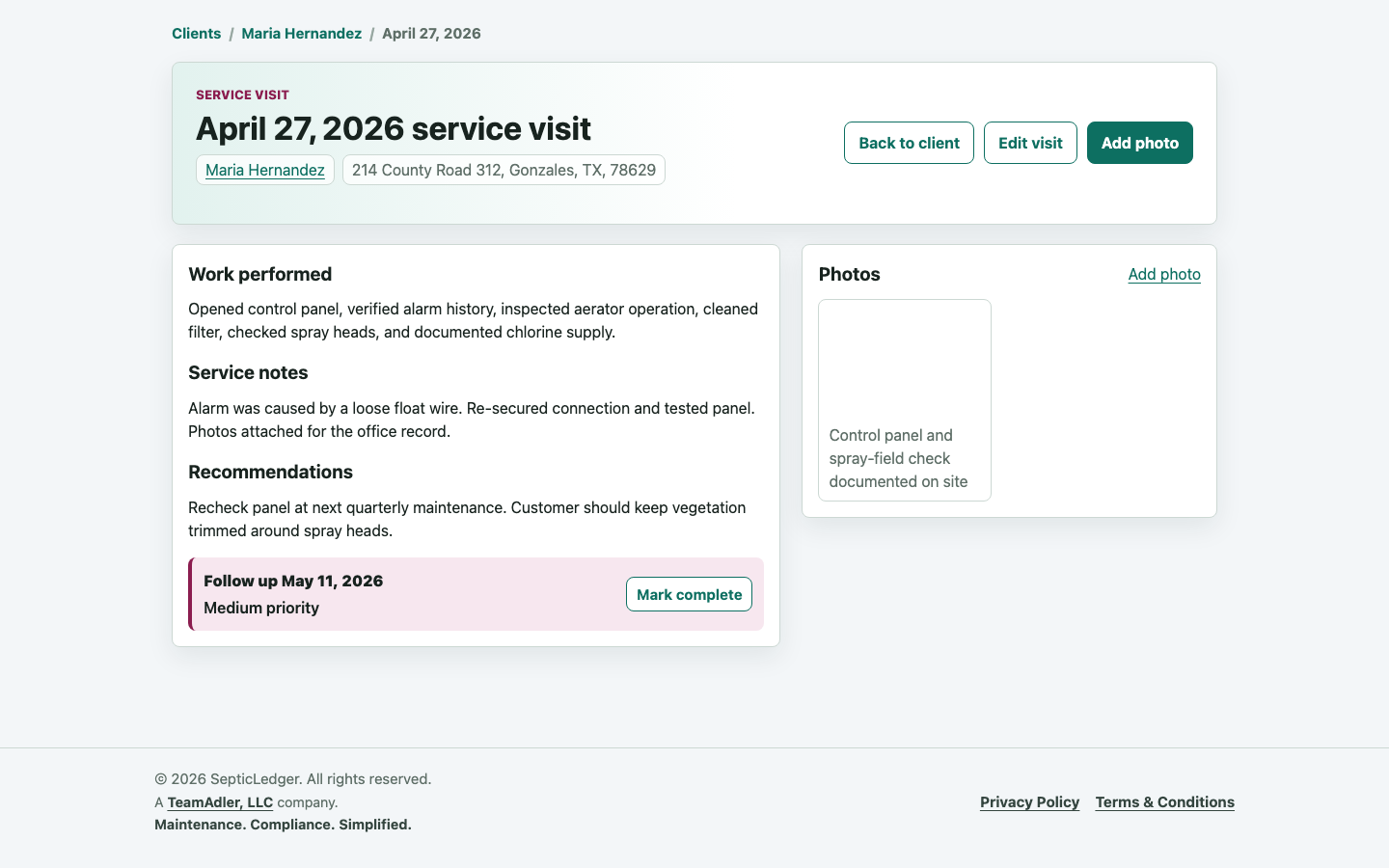
Technicians can record notes, recommendations, follow-ups, and photo documentation without duplicate entry later.
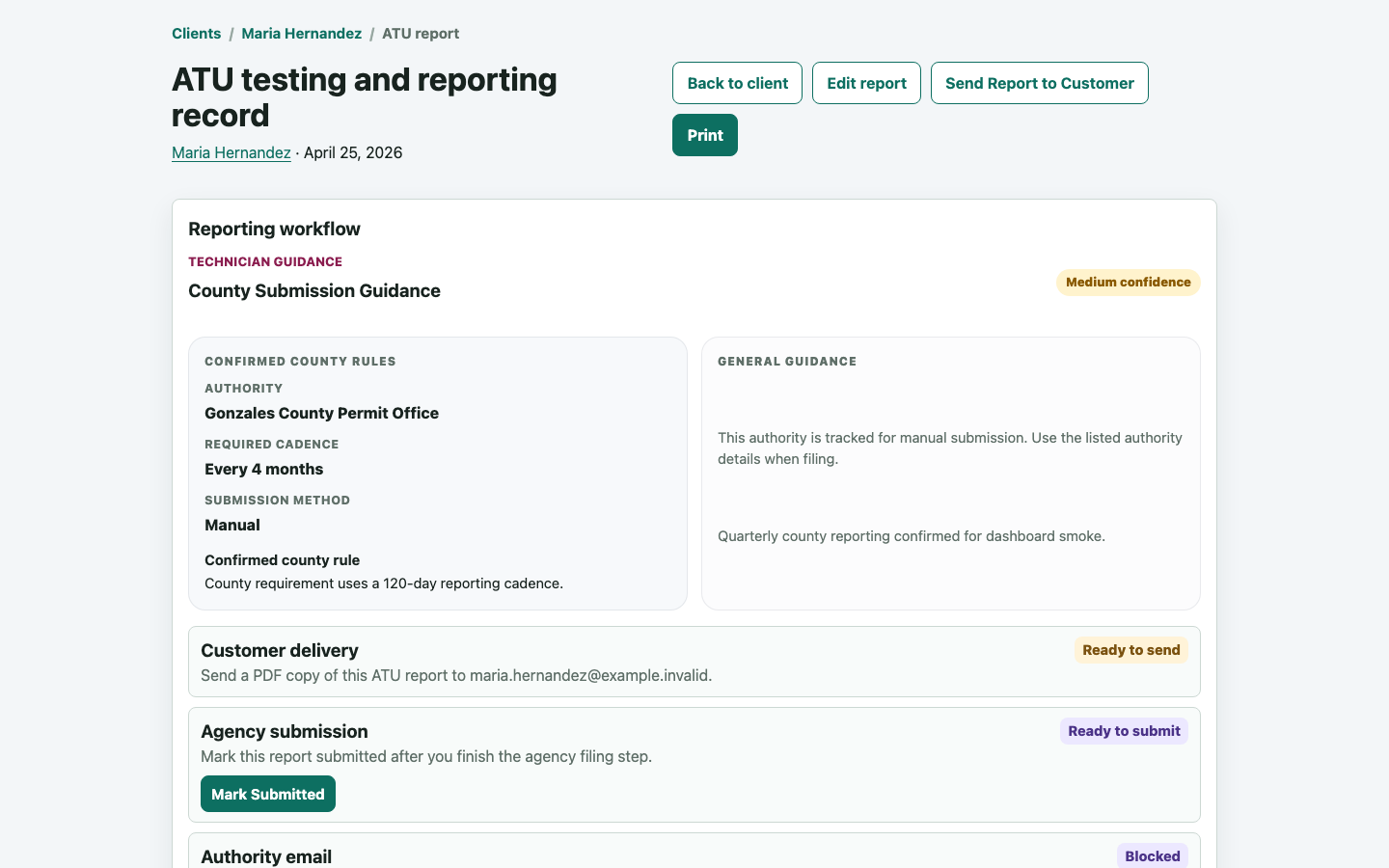
Field notes, photos, findings, customer delivery, agency submission status, and report details stay in one workflow.
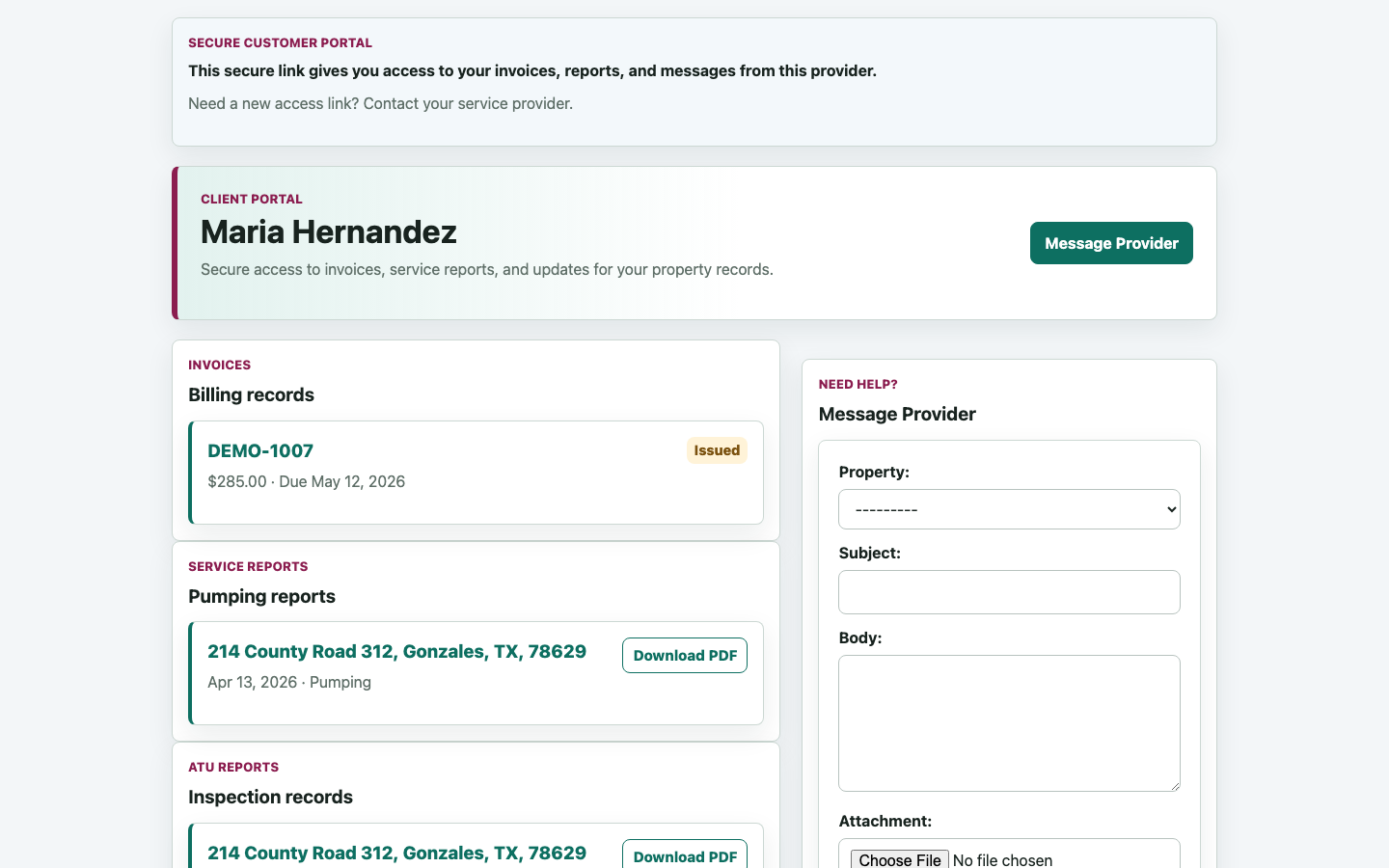
Customers can view invoices, service reports, ATU reports, and messages from a secure access link.
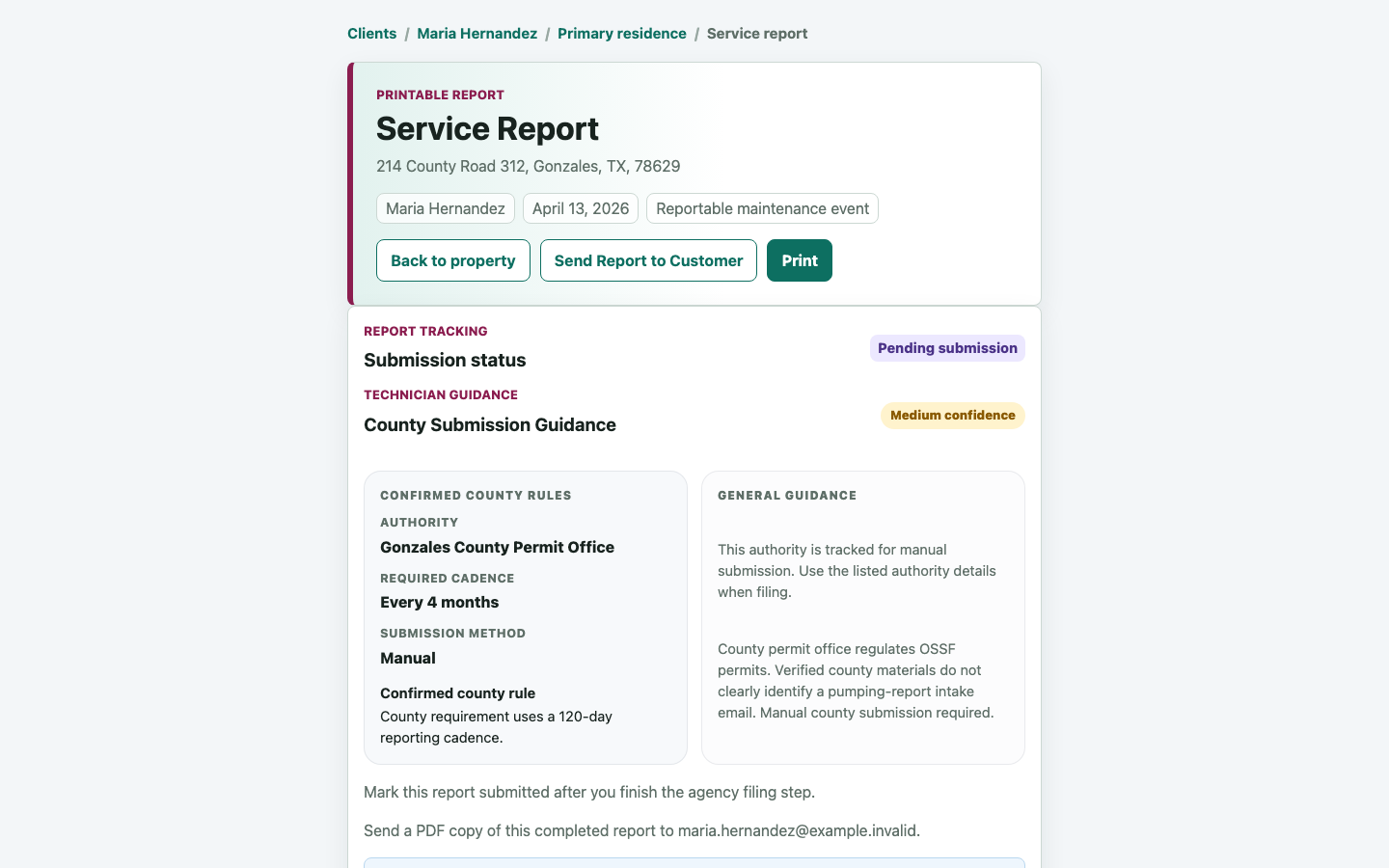
Authority and county guidance stays visible before reporting work is marked submitted.
Include your company logo and branding, share clear, professional reports with customers and authorities, and show photos, notes, and findings in a way customers understand.
Flexible reporting lets you capture what matters to your business, not just the minimum required fields.
Built for the field
Technicians can create and complete jobs on-site, capture photos, notes, inspection details, pumping, maintenance, repairs, and inspections, then access the full property and system history in the field. No paperwork, no duplicate entry.
Today’s work, upcoming work, and completed visits stay easy to reach on mobile and tablet.
Capture photos in the field and have them automatically included in reports. Add notes and context to explain what you find.
Document more than just required fields, without extra steps, so the office and customer can understand the work.
Technicians can review past service, system details, reports, and customer context before work starts.
Built for owners
Owners and operators can see what is due, overdue, completed, and waiting on follow-up while keeping recurring maintenance, reports, invoices, contracts, and customer communication connected.
Due soon, overdue, completed, and review-needed work stay visible from the dashboard.
Maintenance cycles stay tied to properties, systems, completed jobs, and next due dates.
Generate clean, professional reports for customers and counties, with consistent company branding across reports and documents.
Jobs, reports, invoices, contracts, customer messages, and reporting gaps stay connected so findings and next steps are clear.
Compliance Built In
SepticLedger keeps reporting work visible so office staff can see what still needs attention and move directly to the next action.
Track authorized agencies, report completion, report delivery to the customer, and submission status from the same record.
Use the dashboard to see overdue maintenance, report work, and invoice follow-up without hunting through separate systems.
Field Notes
A private, logged-in space where providers can ask questions, share field experience, and talk through real-world compliance scenarios.
Built for practical operator knowledge, not generic forum chatter.
Included for SepticLedger users
Why SepticLedger
SepticLedger is developed and operated by TeamAdler, LLC, a Texas-based company focused on practical software for real-world industries.
The core workflow starts with maintenance scheduling, visit execution, report delivery, and submission tracking.
Agency tracking, reporting steps, and customer paperwork are part of the real operating flow, not an afterthought.
Customers, properties, contracts, jobs, reports, reminders, and invoices stay tied together in one system.
Resources
Plain-English resources for operators who want smoother workdays and fewer reporting surprises.
Verified, in-review, shared-authority, TCEQ-direct, and manual-review coverage categories.
A practical guide to organizing due dates, reports, authority context, reminders, and follow-through.
How Texas OSSF routing can involve counties, shared districts, river authorities, and TCEQ-direct cases.
Operational guardrails for keeping recurring maintenance work visible before it becomes overdue.
Article planned.
Article planned.
Get Started
Create your account when you're ready to get started, or request a guided walkthrough first if you want help mapping SepticLedger to your maintenance and compliance workflow.